
Events in the program can be triggered directly from the audio files. To trigger events from the audio,
place markers into audio files as shown in the image below. These markers must be named e1, e2, e3,
etc., through e15.
When a marker is encountered in the audio, the corresponding label will be called in the program. For
example, if marker e3 is encountered in an audio file, then label e3: will be automatically called in the
program.
In the program, the event labels must be placed in the [wavemark] section of the program.
Fifteen different flags labels can be defined, e1: through e15:
|
Code Example |
Meaning |
|
e1: P3=[x x x 1] |
When a marker flag named e1 is reached in an audio file, set output pin P3.0 to 1. |
|
e7: M4=5 go_here |
When a marker flag named e7 is reached in an audio file, set register M4 to 5 and then jump |
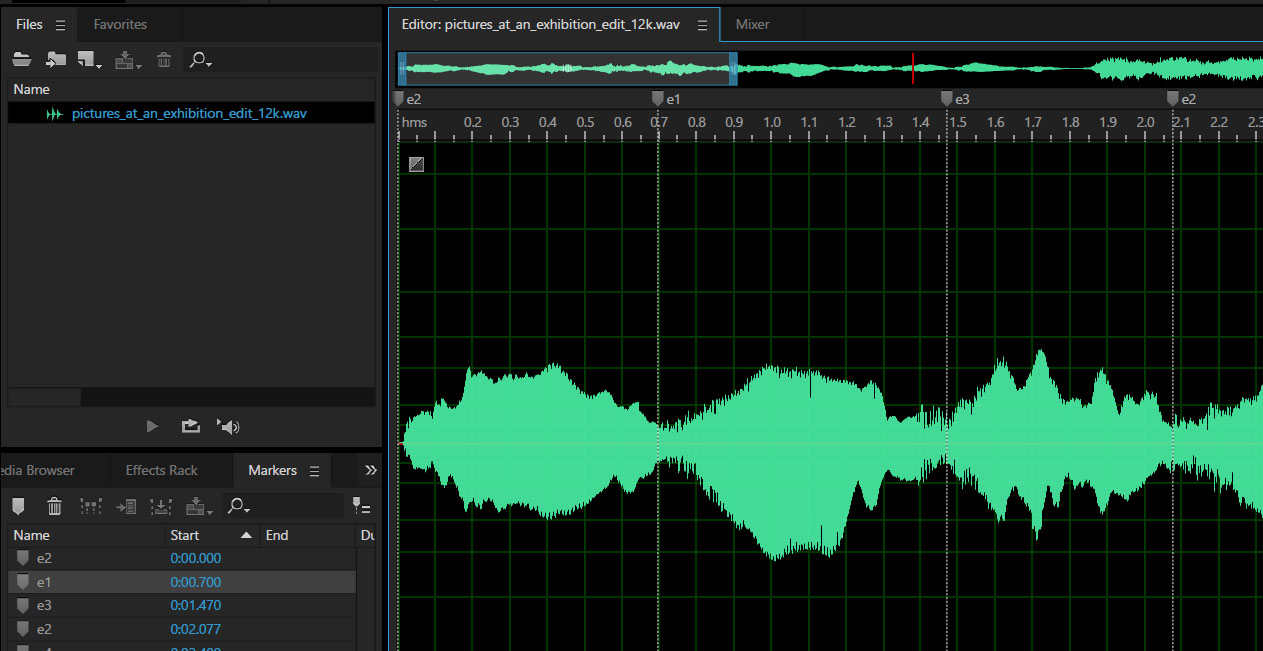
Image Showing Markers Placed in an Audio File (in Adobe Audition)