
Commands
randn?data:label
If the value of a random variable is equal to some specific value then jump to a label somewhere else in the program.
|
Code Example |
Meaning |
|
rand0?9:led_on |
If the value of rand0 is equal to 9, then jump to label "led_on:" |
This command is only valid for 4-bit registers ("Mi" format).
Jump on Input Port Value
Read an input port and compare to a value. If the values are equal, then jump to a label somewhere else in the program.
This command operates by reading all four bits of the input port.
|
Code Example |
Meaning |
|
P2?[0 0 0 1]:label1 |
If input port P2 is equal to 0 0 0 1, then jump to label1 |
|
P2?[0 1 0 0]:label2 |
If input port P2 is equal to 0 1 0 0, then jump to label2 |
|
P2?[1 0 1 0]:label3 |
If input port P2 is equal to 1 0 1 0, then jump to label3 |
|
P2?[1 0 x x]:label4 |
|
This command works with ports P1, P2, and P3.
randn?Mi:label
Compare the value of a random variable to the contents of a register. If the two are equal, then jump to a label
somewhere else in the program.
|
Code Example |
Meaning |
|
rand0?M5:label1 |
Compare the value of rand0 to the contents of register M5. If equal, then jump to label1: |
This commands is only valid for 4-bit registers ("Mi" format).
randn
This command defines a random variable. There are two random variables that can be defined: rand0 and rand1.
The maximum random number that can be generated is 15.
|
Code Example |
Meaning |
|
rand0=12 |
Define random variable rand0 with a maximum value of 12. Generates numbers from 0 to 12. |
|
rand1=15 |
Define random variable rand1 with a maximum value of 15. Generates numbers from 0 to 15. |
Special Notes:
Random variables must be first declared in the [random] section of the program. For example:
[random]
rand0=12
rand1=15
e1, e2, ...
Events in the program can be triggered directly from the audio files. To trigger events from the audio,
place markers into audio files as shown in the image below. These markers must be named e1, e2, e3,
etc., through e15.
When a marker is encountered in the audio, the corresponding label will be called in the program. For
example, if marker e3 is encountered in an audio file, then label e3: will be automatically called in the
program.
In the program, the event labels must be placed in the [wavemark] section of the program.
Fifteen different flags labels can be defined, e1: through e15:
|
Code Example |
Meaning |
|
e1: P3=[x x x 1] |
When a marker flag named e1 is reached in an audio file, set output pin P3.0 to 1. |
|
e7: M4=5 go_here |
When a marker flag named e7 is reached in an audio file, set register M4 to 5 and then jump |
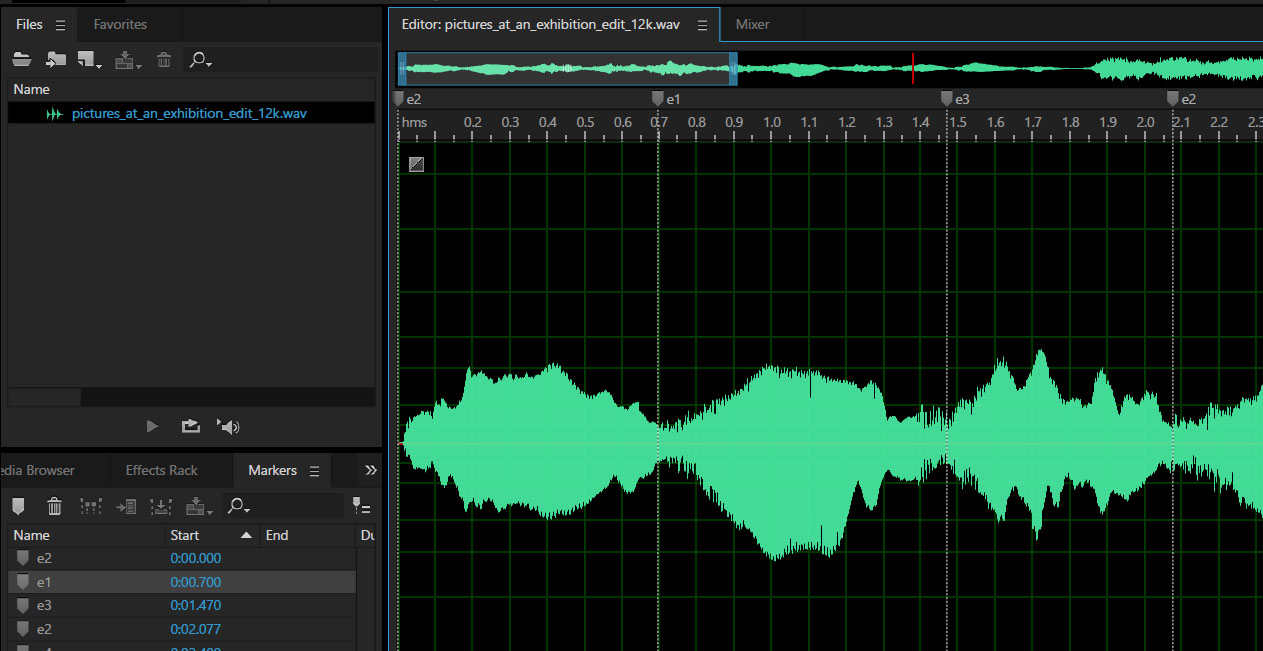
Image Showing Markers Placed in an Audio File (in Adobe Audition)
eflag
This command enables or disables the event marker function in the program.
This command is used in conjunction with markers that are placed in audio files. These markers can be
used to trigger external events, like controlling LEDs or motors, or used to trigger internal events and
commands, like jumping to a different location in the program or changing the contents of a register.
|
Code Example |
Meaning |
|
eflag=1 |
Enable the event marker function. When enabled, the event marker |
|
eflag=0 |
Disable the event marker function. When disabled, the event marker |
Jump on Random Value (Array)
Jump to a label somewhere else in the program based on a randomly generated number.
Code Example
rand0:[label0 label1 label2 label3] label4
Meaning
If rand0 = 0, then jump to label0:
If rand0 = 1, then jump to label1:
If rand0 = 2, then jump to label2:
If rand0 = 3, then jump to label3:
If rand0 does not fall within the array, then jump to label4:
This command is similar to a switch-case statement in C, where the jump location is determined by a random variable.
This is very handy when you want to jump to different locations in the program, but you want those locations to be
chosen randomly.
Mi?data:label
If the content of a register is equal to some specific value then jump to a label somewhere else in the program.
|
Code Example |
Meaning |
|
M2?9:led_on |
If M2 is equal to 9, then jump to label "led_on:" |
|
X6?127:led_on |
If X6 is equal to 127, then jump to label "led_on:" |
Related Commands
| Code Example | Meaning |
| M0>9?:label | If M0 is greater than 9, jump to label: |
| M0>=9?:label | If M0 is greater than or equal to 9, jump to label: |
| M0<9?:label | If M0 is less than 9, jump to label: |
| M0<=9?:label | If M0 is less than or equal to 9, jump to label: |
| M0!=9?:label | If M0 is not equal to 9, jump to label: |
These commands are valid for both 4-bit registers ("Mi" format) and 8-bit registers ("Xi" format).
Play?:label
If there is audio currently playing then jump to a label somewhere else in the program
|
Code Example |
Meaning |
|
Play?:motor_on |
If there is audio currently playing, then jump to label "motor_on:" |
Sometimes it's helpful to know is a piece of audio is still playing. If it is, then the program can use that information
to jump somewhere else in the program.
Mi?Mj:label
Compare the contents of one register to the contents of another register. If the contents are equal, then jump to a label
somewhere else in the program.
|
Code Example |
Meaning |
|
M0?M5:label1 |
Compare the contents of register M0 to the contents of register M5. If equal, then jump to label1: |
|
X0?X2:label2 |
Compare the contents of register X0 to the contents of register X2. If equal, then jump to label2: |
Related Commands
| Code Example | Meaning |
| M0>M5?:label | If M0 is greater than M5, jump to label: |
| M0>=M5?:label | If M0 is greater than or equal to M5, jump to label: |
| M0<M5?:label | If M0 is less than M5, jump to label: |
| M0<=M5?:label | If M0 is less than or equal to M5, jump to label: |
| M0!=M5?:label | If M0 is not equal to M5, jump to label: |
These commands are valid for both 4-bit registers ("Mi" format) and 8-bit registers ("Xi" format).
Jump on Register Value (Array)
Jump to a label somewhere else in the program based on the value of a register.
Code Example
M2:[label0 label1 label2 label3] label4
Meaning
If M2 = 0, then jump to label0:
If M2 = 1, then jump to label1:
If M2 = 2, then jump to label2:
If M2 = 3, then jump to label3:
If M2 falls outside the array, then jump to label4:
This command is similar to a switch-case statement in C. Different locations in the program can be accessed based
on the value of a register. This is very handy when you want to jump to different locations in the program, especially
when incrementing or decrementing the value in a register.